Struggling to choose between a CASTUS Cuts project, a Simple Playlist, or setting up a Smart Folder? CASTUS offers an array of amazing tools to tailor your playback experience. Let's explore a few:
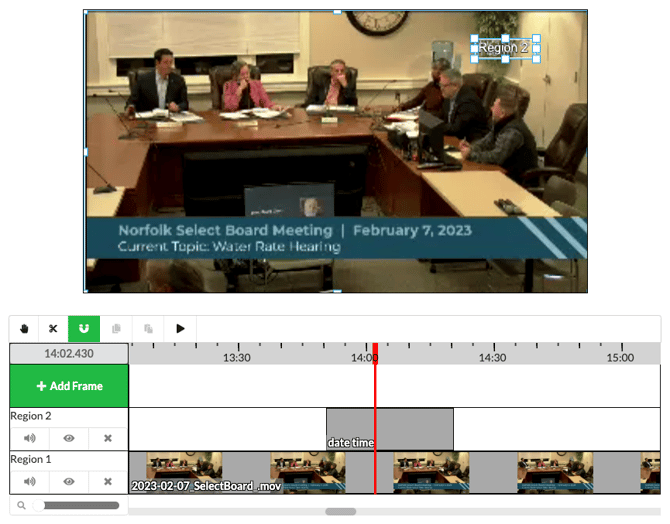
CASTUS Cuts
A simple, non-linear editor that uses layers to build projects.
-
Add images, videos, animated files, live inputs, text items, and music
-
Nest projects (embed one CASTUS Cuts project inside another)
-
Duration is based on the total length of its contents
-
Supports text overlays like “Coming Up Next,” bulletin boards, or RSS feeds
-
Popular uses: “Coming Up Next” slides, multi-region bulletin boards (images, RSS feeds, logos), and adding text to live or recorded events
Simple Playlist (V5 Only)
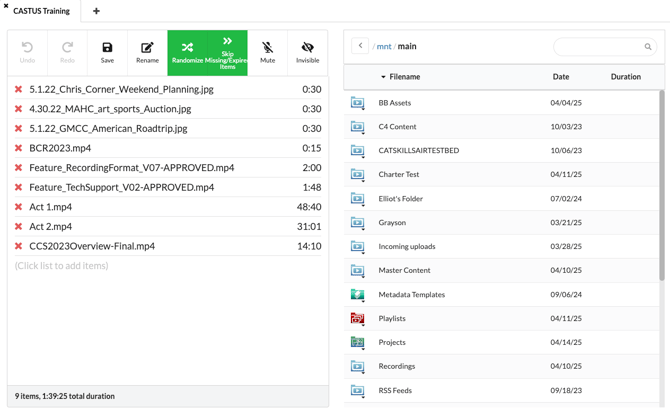
Create playlists with flexible ordering and easy editing.
-
Add images, videos, CASTUS Cuts projects, folders, or other playlists
-
Choose between sequential or randomized playback
-
Duration is determined by the combined length of all items
-
Use Click & Stick to add items
-
Rearrange items with drag-and-drop
-
Manually adjust durations for images and video files
-
Popular uses: Bulletin boards, groups of short videos or PSAs
Smart Folder
Automated scheduling tool that selects content based on metadata.
-
All items must have durations assigned via metadata
-
Apply the Order (of Playback) tag to control sequence (lexicographical or random)
-
Automatically selects items that fit a given time slot in a schedule
-
Convert a folder to a Smart Folder by selecting Action > Generate Metadata
-
Popular uses: Filling schedule gaps with randomized content like PSAs, station IDs, or evergreen clips