
A Simple Playlist lets you create a sequence of media items from your CASTUS library to play in order or randomly. You can easily Click & Stick items into the playlist and rearrange them using drag-and-drop within the Playlist Editor. Once your playlist is arranged, don’t forget to save your project.
Creating a Playlist
- Open a new playlist by going to CASTUS > Simple Playlists.
- Find your media in the library widget on the right hand side.
- Click and stick your media item(s) into your playlist.
- If your item does not have a duration, click on 0:00 next to the item in the playlist and enter a duration.
- Drag and drop to rearrange items.
- To remove an item, click the red X next to it.
- Media items may be added more than once into a single simple playlist.
- Save your changes.
- Add your playlist to your schedule or use it as a schedule default between programming.
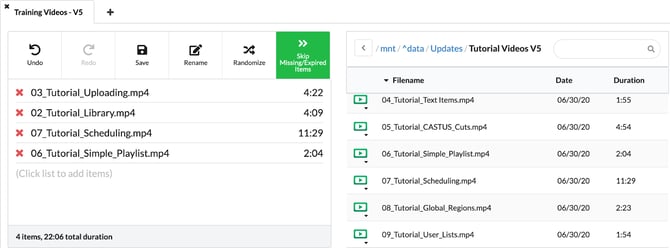
Playlist Controls
-
Undo: Revert your last action.
-
Redo: Reapply the last undone action.
-
Save: Save your Simple Playlist (defaults to the Playlists folder).
-
Randomize: Toggle to play items in random order; when off, items play in set order.
-
Skip Missing or Expired Items: Automatically skip media no longer in the library or past their metadata expiration date. Green = On, White = Off.