Sending to Video on-Demand from your QuickRoll, QuickCast, or Mini servers is quick and easy.
Existing Videos or Recorded on CASTUS
When you have existing videos on your server, whether they were previous uploads or content recorded directly to the CASTUS, you can use the dropdown in the Library to send over to Video on-Demand.
- Locate your desired file in the Library.
- Select the dropdown located to the left of the filename on the icon.
- Choose Send to Video On Demand from the dropdown list.
- Monitor and manage uploads in the File Transfer window.
NOTE: Any metadata added, name changes made, captions linked, and trims made will transfer over to the cloud at the time of upload. These files do NOT remain connected so edits after sending to Video On-Demand will not be reflected on the cloud version of the video.
Cloud Options
In software versions 5.8.1 and later, there are additional options to caption the file using File-Based captions and to add directly to a playlist. Select the option(s) you want to use before sending to VOD.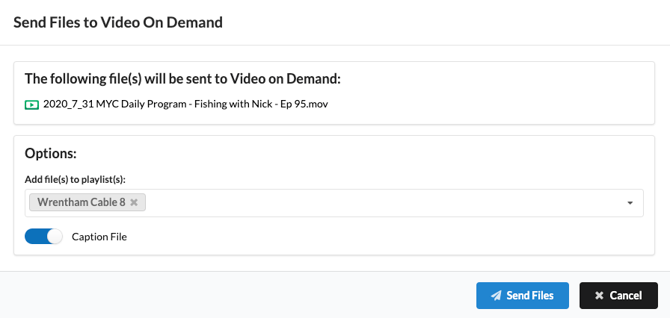
NOTE: You must have a File-Based caption subscription to use the caption video option in this menu.
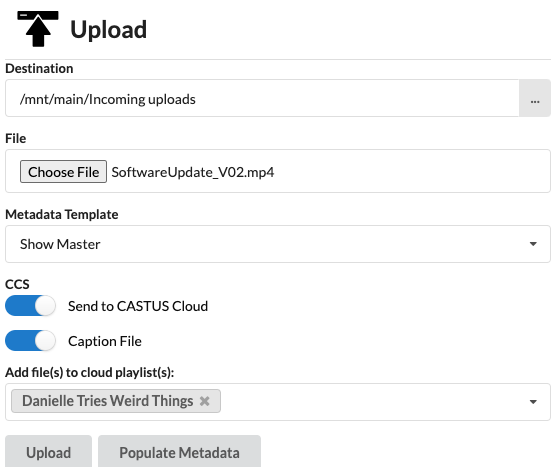
When Uploading to the Server
In software versions 5.8.1 and later, an additional set of options is available for CASTUS Video on-Demand and file-based captioning users.
Send to CASTUS Cloud - Select this option before uploading your file if you'd also like to send the video to Video on-Demand at the same time.
Caption File - File-based captioning customers can choose to automatically caption a file once sent to VOD by turning on Caption File.
Add file(s) to cloud playlist(s) - Automatically add your uploaded video to a playlist by selecting the playlist(s) from the dropdown before sending to VOD.