
CASTUS servers typically operate continuously, but if a restart or shutdown is necessary, please adhere to the procedures outlined for your unit. The software does not include a menu option for shutting down or restarting your unit; instead, utilize the physical buttons as instructed below or execute the command init 6 in the command line to restart.
NOTE: Sometimes a unit may not automatically power back on after using init 6, so this option should only be used when you are physically present at the server to manually restart it if required.
To maintain your server's health, CASTUS advises restarting your unit quarterly to ensure optimal performance.
QuickRoll, QuickCast, & QuickStream Units
A QuickRoll, QuickCast, or QuickStream unit can be recognized by its mounting system. These units are all designed for rack mounting, available in either 2RU or 3RU sizes. If your server is rack-mounted, please follow the instructions below.
Opening the Access Door
Rack-mounted units feature two access doors at the front. The power rockers are situated beneath the right-hand door on all units. For a QuickRoll, the left door exposes the drive bay, whereas for a QuickCast or QuickStream, it reveals the fans.
- Position yourself in front of the CASTUS unit so you can see the front decals, keylock, and both doors.
- Rotate the latch around the keylock to the vertical position so it is unlatched.
-
To open the right outer door, place your right-hand fingers beneath the left edge of the door as illustrated in the diagram, and pull the door outward. You may need to use moderate force to open the door.
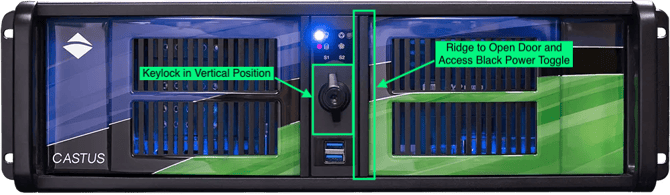

Black Power Rocker
The black power rocker is the main startup and shut down access for these rack-mounted units.
- Press and release the black rocker to turn off the unit.
- Wait about 20 seconds or longer.
- Press and release the black rocker to turn on the unit.
For additional information about logging back in once the unit is up and running, visit the article on Unboxing and Setting Up the CASTUS Server.
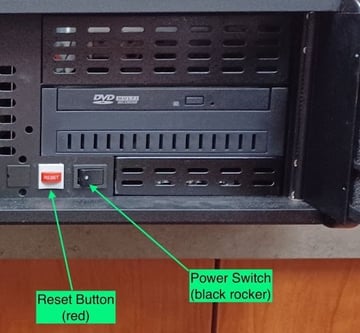
Red Reset Button
The red reset button is not intended for routine restarts of the unit. It should only be employed in exceptional cases when the system fails to respond to the black rocker. Regular use of this button for restarts can lead to improper shutdowns and may result in RAID and hard drive problems.
- Press and release red reset button.
Mini Units
Mini units have a desktop form factor and do not mount to an equipment rack. Both the power button and the reset button are visible on the front of the unit.
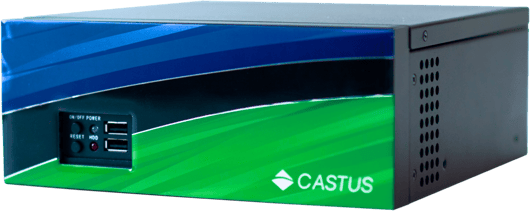
Power Button
- Press and release the top black power button to turn off the unit.
- Wait about 20 seconds or longer.
- Press and release the top black power button to turn on the unit.
For additional information about logging back in once the unit is up and running, visit the article on Unboxing and Setting Up the CASTUS Server.
Reset Button
The bottom reset button is not intended for routine restarts of the unit. It should only be employed in exceptional cases when the system fails to respond to the black power button. Regular use of this button for restarts can lead to improper shutdowns and may result in hard drive issues.
- Press and release bottom reset button.