Inputs
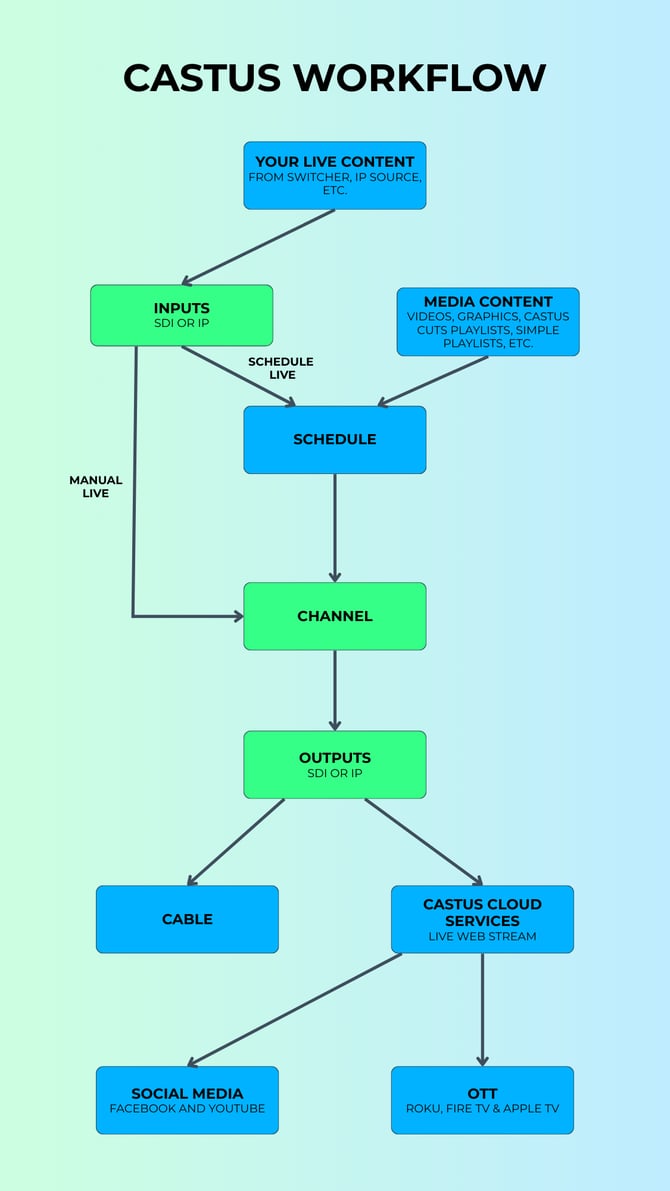
Inputs deliver your live content, whether it's an SDI connection from a meeting room, an RTMP from a remote location, or various other formats. These inputs can be integrated into your schedule for an automated workflow or activated live manually on your channel for greater control, bypassing the schedule.
Input Protocols: HTTP, HLS, IP input transport stream, Newtek NDI, RTMP, RTP, RTSP, SDI, SRT, TCP, UDP, and Video 4 Linux.
Channels
Channels are crafted to organize your content, whether it involves a schedule, a Simple Playlist, a CASTUS Cuts Project, or a live input. Typically, customers opt to assign a schedule to their channel and incorporate their media into it. Any asset can be assigned to the channel according to the specific requirements of your organization.
Every system comes with a minimum of one licensed channel and a preview channel. The licensed channel(s) are capable of delivering content to your output(s). The preview channel is designed for internal purposes, allowing you to review your content, schedule, or live programming before broadcasting it. QuickCast and Mini systems are limited to a single channel, whereas QuickRoll systems can accommodate multiple channels.
Outputs
Outputs are engineered to transmit the content playing on your channel to a specified destination. Like inputs, outputs can be either SDI or IP, supporting various formats and configurations. For PEG stations, cable outputs are generally SDI, whereas outputs to CASTUS Cloud Services or other locations are IP-based.
Output Protocols: HLS, NDI, RTMP, RTP, SDI, SRT, and UDP.
Increasing Capacity
Servers are initially set up with the licensed number of Inputs, Channels, and Outputs that have been purchased. SDI inputs and outputs are fixed and cannot be expanded without hardware reconfiguration. However, IP inputs, channels, and IP outputs can be added to QuickRoll systems, depending on the internal components purchased. QuickCast and Mini systems do not support expansion.
For details on your current setup or to evaluate your system for IP Input/Output or Channel expansion, please contact support@castus.tv.
For pricing details on adding additional IP Inputs/Outputs or Channels, please contact sales@castus.tv.
CASTUS Workflow
The below workflow outlines a typical workflow for a CASTUS customer. Your workflow may differ from below based on your individual needs.