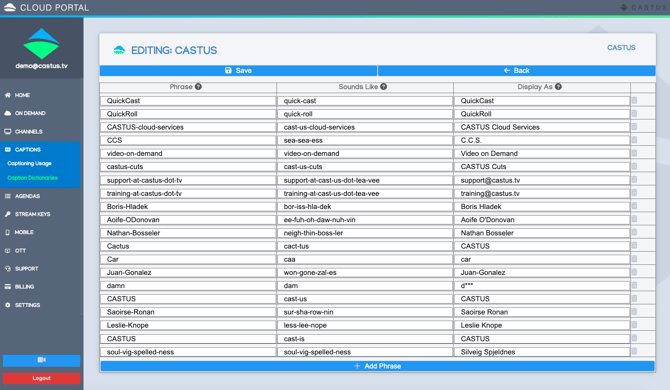
Captioning customers can enhance the already remarkable accuracy of over 97% in their captioning by developing and managing a personalized dictionary within the CASTUS Cloud Portal. This dictionary allows you to provide a phonetic breakdown and display text for challenging names, terms, locations, and acronyms.
- Sign in to cloud.castus.tv/admin and choose Captions from the main menu followed by Caption Dictionaries.
- Create a new dictionary to get started, and add the phrase, sounds like, and display as fields for each item.
- Hover over the question mark for each to display the rules for each field, or see below:
- PHRASE: Required. Every row in your table must contain an entry in this column. Do not use spaces is this column. If your entry contains multiple words, separate each word with a hyphen (-). For example, Andorra-la-Vella or Los-Angeles. For acronyms, any pronounce letters must be separated by a period. If your acronym is plural, you must use a hyphen between the acronym and the 's'. For example, 'CLI' is C.L.I. and 'ABCs' is A.B.C.-s. If your phrase consists of both a word and an acronym, these two components must be separated by a hyphen. For example, 'DynamoDB' is Dynamo-D.B..
- SOUNDS LIKE: Optional. Rows in this column can be left empty. Do not use spaces in this column. Include your entry as a hyphen-separated syllables that mimic how the word sounds. It's better to use small, common words over phonetic representations. For example, for 'Los Angeles', 'loss-an-gel-es' is preferred to 'lahs-ahn-jul-ees'.
- DISPLAY AS: Optional. Rows in this column can be left empty. You can use spaces in this column. Defines how you want your entry to look in your transcription output. For example, Andorra-la-Vella in the phrase column is Andorra la Vella in the Display As column. If a row in this colmn is empty, Amazon Transcribe uses the contents of the Phrase column to determine output.
- Save your changes.
- You can only use one dictionary at a time, so consider either consolidating your entries into a single comprehensive dictionary or logging into the portal in advance to select the dictionary you wish to utilize for your captioning.